Task related reserved words used in Notifications
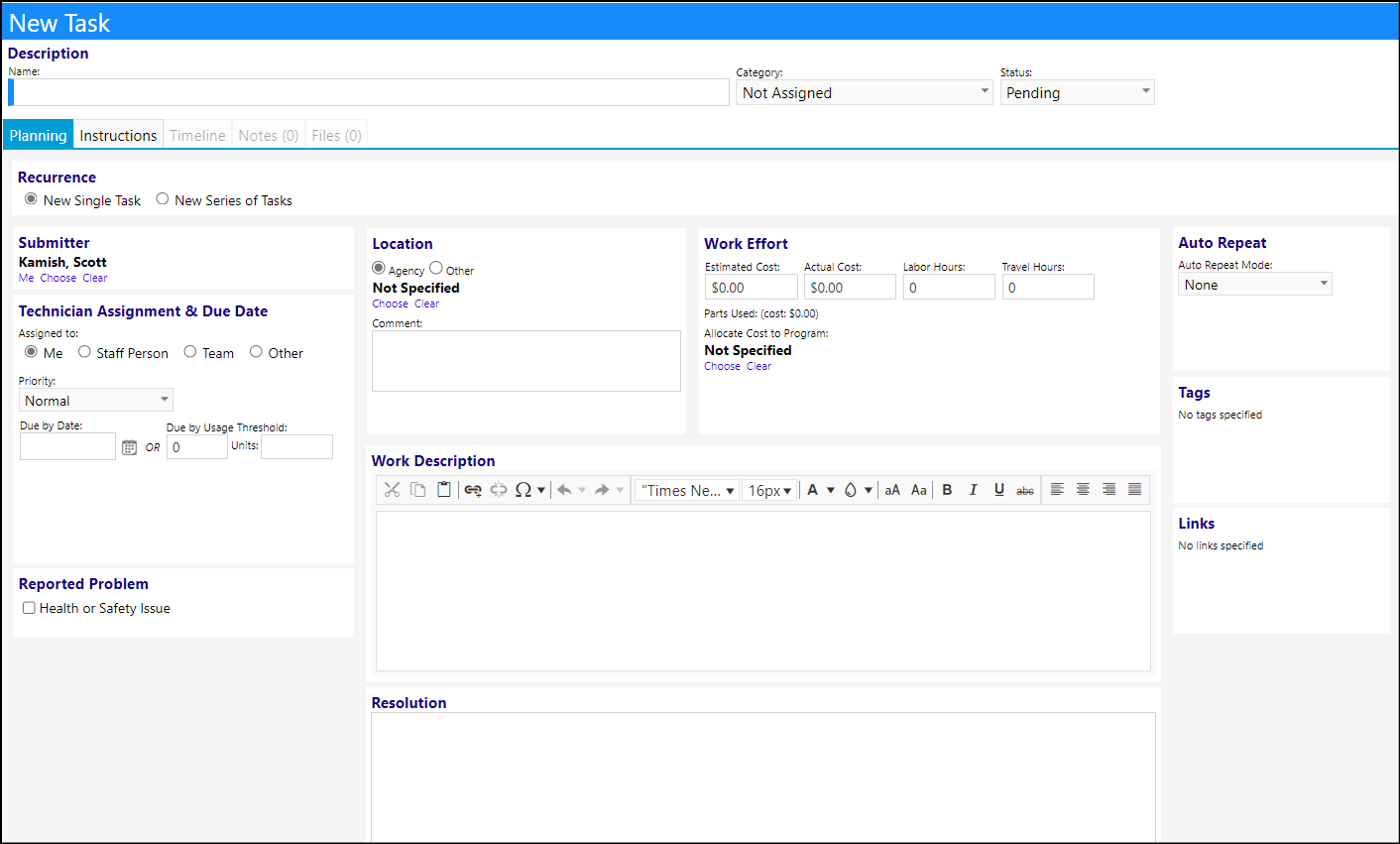
When users create notifications related to Tasks, there is a list of reserved words they can use in the notification 'Message To Deliver'. This article will present that list and will identify the most commonly used reserved words for Task related notifications.
Reserved Word List for Tasks
The following is the list of reserved words used for Tasks. The reserved words displayed in bold and in italics are the most commonly used Task related reserved words.
- TaskActualCost ::: (info) The Task Actual Cost comes from the Work Effort box :::
- TaskAssignedTo
- TaskAssignedToGroup ::: (info) The Task Assignment and Task Assigned to Group are pulled from the Technician Assignment & Due Date box when a Team is selected :::
- TaskCategory ::: (info) The Task Category is pulled from the Description section of the Task :::
- TaskCompletedOn ::: (info) When the status is changed to Done, a Completed Date box will display in the Technician Assignment & Due Date box. The Task Completed On is pulled from that date :::
- TaskDetails
::: (info) The Task Details comes from the Work Description box ::: - TaskDueDate ::: (info) The Task Due Date is pulled from the Technician Assignment & Due Date box :::
- TaskEstimatedCost ::: (info) The Task Estimated Cost comes from the Work Effort box :::
- TaskFacilityLocation
- TaskFacilityLocationID ::: (info) When an Agency is chosen in the Location box, the user will select a Facility or Facility-Location. This information is pulled from that box. The Facility Location ID can be viewed in the Location tab on the Facility :::
- TaskHealthAndSafetyIssue ::: (info) If a Task has been designated as being a Health or Safety Issue, then this designation will be captured from the Reported Problem box :::
- TaskID ::: (info) The Task ID is the number associated with the Task :::
- TaskLaborHours ::: (info) The Task Labor Hours comes from the Work Effort box :::
- TaskLocationOther
- TaskLocationComment
Info
The Task Location Other and Task Location Comment come from the Location Comment box. The Task Location Other comes from the box which displays beneath the Agency and Other radio buttons, when the radio button for Location Other is selected. The Task Location Comment is pulled from the Comment box in that Location box
- TaskOtherName
- TaskPriority ::: (info) The Task Priority comes from the Technician Assignment & Due Date box :::
- TaskProblem
- TaskProblemArea ::: (info) The Task Problem and Task Problem Area come from the Reported Problem box only when the Task is initiated from a Service Request (Workorder). The Problem is entered directly onto the Workorder as is the Problem Area :::
- TaskProgram
- TaskProgramID ::: (info) The Task Program and Task Program ID come from the Work Effort box. The Task Program is pulled from the Allocate Cost to Program selection in that Work Effort box. The Task Program ID is pulled from the Program List and is the ID number for that program :::
- TaskRequestedBy
- TaskRequestedByEmail
- TaskRequestedByPhone ::: (info) The Task Requested By, Task Requested By Email, and Task Requested By Phone are all pulled from the Submitter box :::
- TaskRequestedOn ::: (info) The Task Requested On is pulled from the system and represents when a user created and submitted the task. This date can be viewed in the Task List as the Requested On Date :::
- TaskResolution ::: (info) The Task Resolution pulled from the Resolution box ::: TaskStatus ::: (info) The Task Status comes from the Description box :::
- TaskSubject ::: (info) The Task Subject comes from a combination of the Category and the Task Name, both of which are in the Description box, or in the case of a Service Request (Workorder) initiated Task, the Task Subject comes from a combination of the Associated Item box and the Task Name :::
- TaskTravelHours ::: (info) The Task Travel Hours comes from the Work Effort box :::
Sample Task: